Price Products by Attribute. No Variations Needed.
PriceBlueprint is a free WooCommerce plugin. Define pricing rules once — "Size XL adds $10", "Material Oak adds $25" — assign the blueprint to any product, and the price updates live on the page.
One blueprint covers unlimited products in your catalog
Change one rule and every product updates instantly
Live price calculator + full cart and order records
If your product price changes based on size, material, color, or any other attribute — but you don't need separate stock or images per combination — PriceBlueprint replaces WooCommerce variations with simple rules. A product with 5 attributes × 5 values needs 3,125 WooCommerce variations but only 25 blueprint rules.
Use case
Furniture stores
Material, finish, size, and leg type. With variations: 256+ records per product. With PriceBlueprint: 4 rules, one blueprint for the whole catalog.
Use case
Print-on-demand
50 t-shirts, each with sizes S–XL. Supplier raises XL price. PriceBlueprint: change one rule, all 50 products update instantly. WooCommerce: 50 manual edits.
Use case
Configurable products
Software licenses, custom engravings, made-to-order items: any product where the price depends on selected options, not stock quantities.
4 materials × 3 sizes × 3 colors = 36 variations to create, price and maintain. Raise the price on one material and you're editing dozens of records one by one.
WooCommerce Variations
36 variations to manage
Fabric / S / RedFabric / S / BlueFabric / M / RedFabric / M / BlueLeather / S / RedLeather / S / BlueLeather / M / Red+ 28 more...
Change leather price → edit 12 records
VS
PriceBlueprint
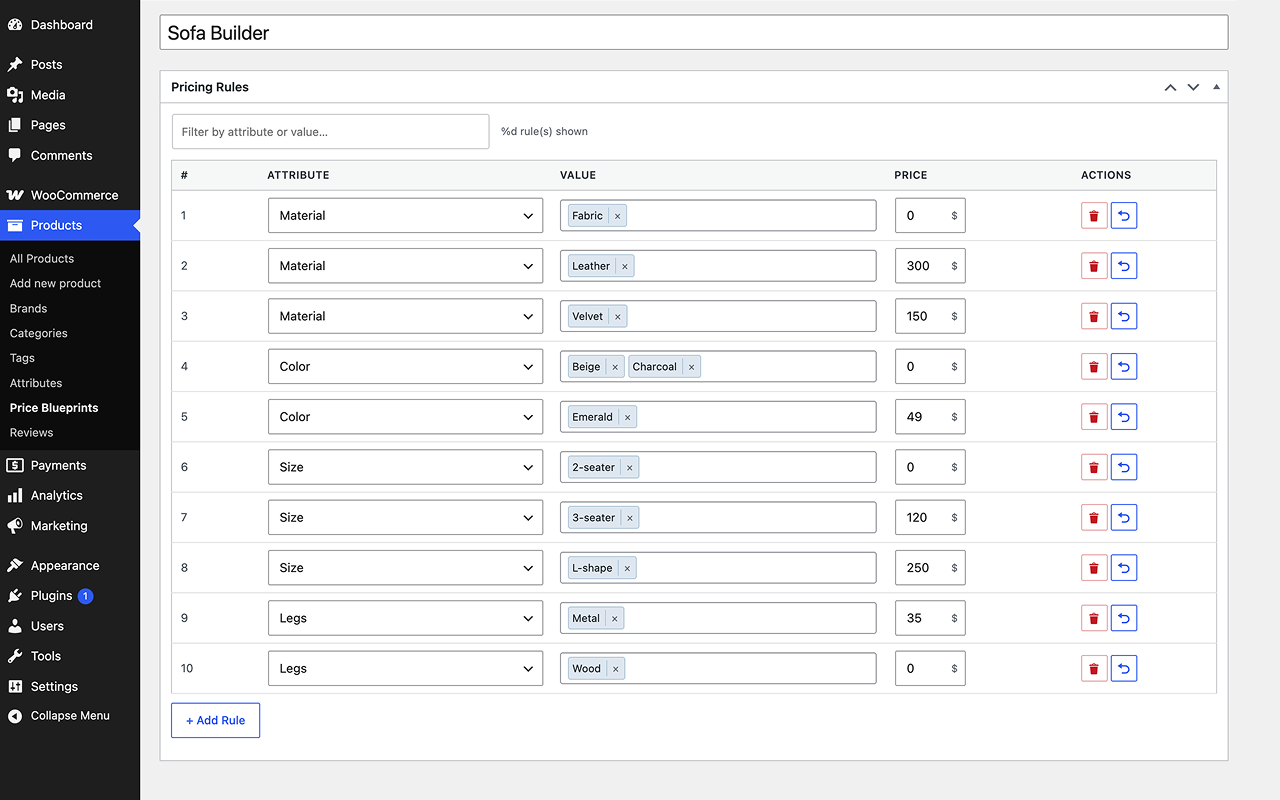
4 rules. All products covered.
Material: Fabric→+$0
Material: Leather→+$300
Size: S / M→+$0
Size: L / XL→+$50
Change leather price → edit 1 rule
Comparison
WooCommerce variations vs PriceBlueprint
WooCommerce variations are designed for products with distinct stock, images, or SKUs per combination. For attribute-based pricing where the only difference is price, they introduce unnecessary complexity. Here is how the two approaches compare.
Criteria
WooCommerce Variations
PriceBlueprint
Scalability
Exponential: combinations multiply with each new attribute value
Linear: rules grow only with unique values, never combinations
Database usage
1 row per variation × number of products (can reach thousands)
1 rule per attribute value, shared across all products
Performance
Slower product pages and admin with large variation counts
Fast: no variation queries; price calculated at runtime from rules
Reusable pricing rules
❌ Prices set per product, per variation
✅ One blueprint shared across unlimited products
Live price update
✅ Built-in (requires variation per combination)
✅ Built-in via AJAX, no combination records needed
Catalog price update
Edit every variation on every product individually
Change one rule in the blueprint and all products update instantly
Product setup time
High: generate and price every combination separately
Seconds: assign existing blueprint, done
Best for
Products with unique stock, images, or SKUs per combination
Attribute-based pricing where only the price varies by selection
How it works
Three steps and you're done.
Same attribute setup as WooCommerce. The difference is what happens next.
1
Create a Blueprint
Add your attributes and set a price modifier for each value. Size XL adds $10, Material Oak adds $25. As many rules as you need.
2
Assign to Products
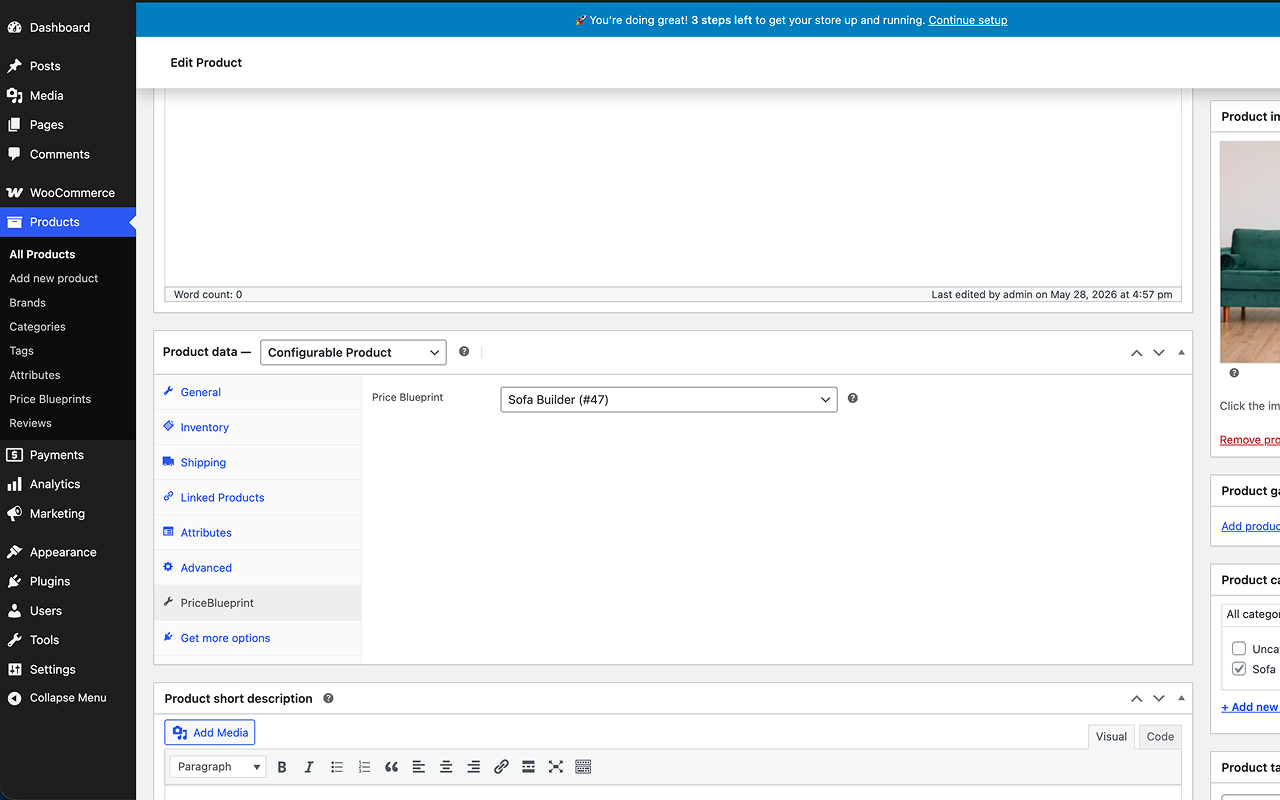
Attach the blueprint to any product in seconds. One blueprint can cover your entire catalog if the pricing logic is the same.
3
Update Once, Done
Change a rule in the blueprint and every product using it updates automatically. No touching individual products.
Features
Built for real stores. Not checkbox demos.
♻️
Reusable Blueprints
One blueprint can be assigned to unlimited products. Update pricing logic in one place, everywhere reflects it.
⚡
Live Price Calculator
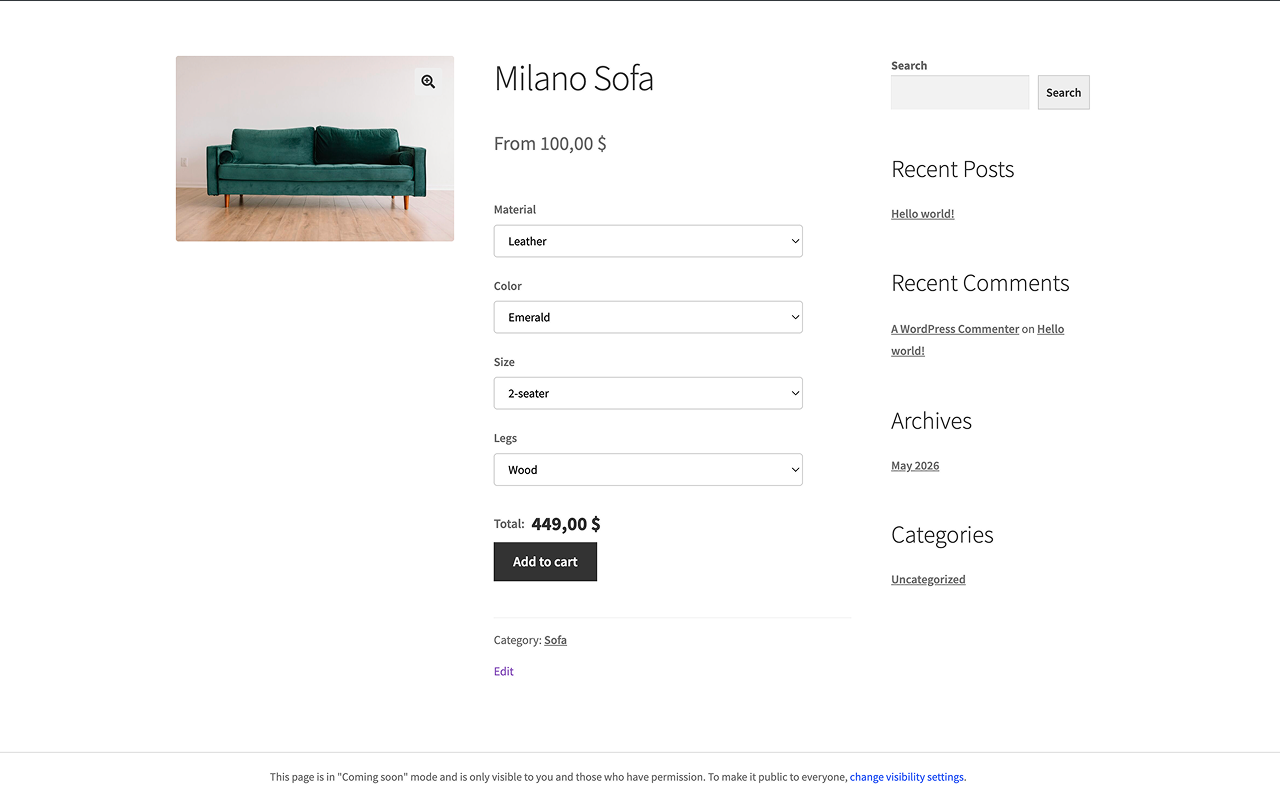
The price updates in real time as customers pick their options. No page reload, no waiting.
🛒
Full Cart Integration
Attribute selections and the configured price carry through cart, checkout, and order confirmation correctly.
📋
Complete Order Records
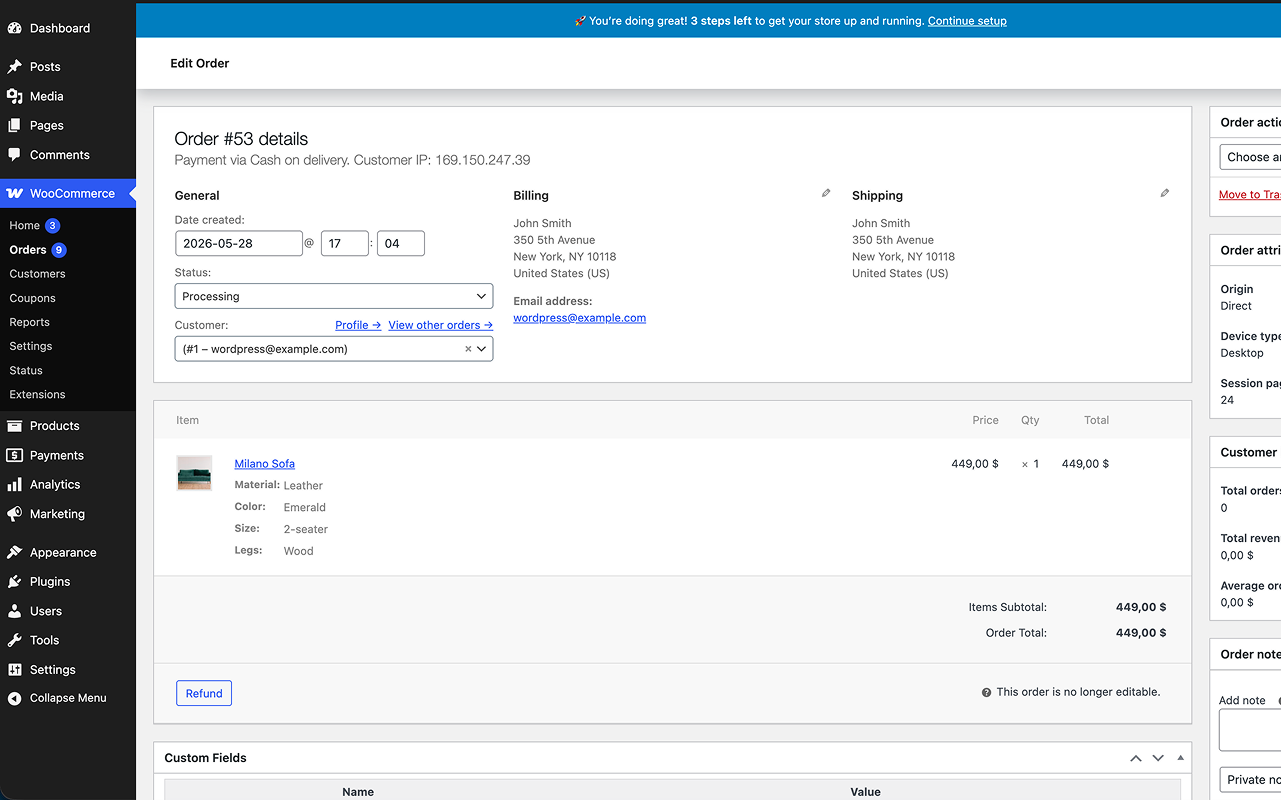
Selections show up in WC Admin, order emails, the Thank You page, and My Account. Everywhere customers expect to see them.
🗄️
Zero Variation Bloat
No per-combination records written to the database. Cleaner store, faster queries, less maintenance overhead.
🔧
All Price Operators
Add, subtract, multiply, divide, or set a fixed price per attribute value. Works with any native WooCommerce global attribute.
Also included
✓ Unlimited rules per blueprint✓ Unlimited products per blueprint✓ Required attribute fields✓ Schema.org structured data✓ HPOS compatible✓ RTL support✓ 9 languages✓ Works with any WC-compatible theme
From setup to first order
The full flow in four steps.
Create a blueprint, assign it to a product, let customers configure. Every selection gets recorded in the order automatically.
1
Create a Blueprint
Define pricing rules for each attribute value. Unlimited rules, unlimited attributes. Size XL adds $10, Material Oak adds $25, as many as your products need.
2
Assign to a Product
Pick any product and select your blueprint. Done. One blueprint works across your entire catalog. No need to set up pricing on each product separately.
3
Customer Configures & Buys
Customers select attributes and the price updates in real time. No page reload needed. The configured price goes straight into the cart.
4
Order Recorded with Full Details
Attribute selections and the configured price appear in WC Admin, order emails, and My Account. Everything your customer chose is right there in the order.
FAQ
Frequently asked questions.
Everything you need to know about WooCommerce attribute pricing with PriceBlueprint.
WooCommerce variations create one database record per attribute combination. Four sizes × three colors = 12 variations to create and maintain. PriceBlueprint uses pricing rules instead: one rule per attribute value, calculating the final price at runtime. No combinations, no variation bloat, and changing one rule updates every product that uses the blueprint.
A blueprint is a reusable set of attribute pricing rules. Each rule maps an attribute value to a price modifier, for example, "Size: XL → add $10" or "Material: Oak → add $25". You create the blueprint once, assign it to as many WooCommerce products as you need, and the plugin calculates the final price live on the product page based on the customer's selections.
Yes, that is the core feature. One blueprint can be assigned to unlimited WooCommerce products. When you update a rule in the blueprint, every product using it reflects the change immediately, without editing any individual product.
PriceBlueprint supports five operators per attribute value: add a fixed amount to the base price, subtract a fixed amount, multiply the base price by a factor, divide it, or set a completely fixed price. This covers the vast majority of attribute-based WooCommerce pricing scenarios.
Yes. Price calculations happen via AJAX on the product page, so full-page caching does not interfere with the real-time price calculator. The static cached page loads normally, and the live price calculator runs on top of it.
New sessions get the updated price immediately. Items already in an existing cart recalculate on the next page load, so customers always see the current price before checkout.
PriceBlueprint integrates via standard WooCommerce hooks and is compatible with any WooCommerce-compatible theme, including Storefront, Flatsome, Astra, and block-based themes. The attribute selector uses minimal CSS and inherits your active theme's styles automatically.
PriceBlueprint is fully compatible with WooCommerce High-Performance Order Storage (HPOS). Attribute selections and configured prices are stored and retrieved correctly under both the legacy posts table and the new orders table.
PriceBlueprint is designed for simple WooCommerce products where the price is determined by attribute selections rather than by pre-created variation records. It works alongside your existing variable products. You decide which products use blueprints and which use standard variations.
Yes. Every attribute selection and the resulting configured price are stored with the WooCommerce order. They appear in WC Admin, order confirmation emails, the Thank You page, and the customer's My Account order history, everywhere customers and store owners expect to see them.
WooCommerce writes one post and associated metadata rows per variation. A product with 5 attributes × 5 values creates 3,125 variation records. Multiplied across a catalog, this inflates the wp_posts and wp_postmeta tables, slows product page queries, makes WooCommerce Admin sluggish, and increases backup sizes. PriceBlueprint avoids this entirely by never writing per-combination records.
PriceBlueprint requires WordPress 6.0 or higher, WooCommerce 6.0 or higher, and PHP 7.4 or higher. It is free to download from the WordPress.org plugin repository and works on any hosting environment that meets these requirements.
Yes. The free version on WordPress.org is fully functional: unlimited products, unlimited rules per blueprint, all five price operators, live price updates, full cart and order integration, and 9 language translations. No artificial limits, no required upgrades.
About
Built by a WooCommerce developer, for WooCommerce stores.
PriceBlueprint was built by Edgar Khachaturov, a WordPress and WooCommerce developer with 7 years of experience building e-commerce solutions. The plugin was created to solve a real problem encountered in production stores: WooCommerce's variation system does not scale for attribute-based pricing use cases.
The free version is published on the official WordPress.org plugin repository, where it undergoes review by the WordPress plugin team. The plugin follows WordPress coding standards, uses WooCommerce's native hooks and data layer, and is compatible with WooCommerce HPOS.
Support is provided directly by the developer at support@getpriceblueprint.com and through the WordPress.org support forum.
🏪
WordPress.org hosted
Reviewed and listed on the official WordPress.org plugin repository. Free to download and install from any WordPress dashboard.
🔌
WooCommerce native
Built exclusively on WooCommerce hooks, filters, and data APIs. No proprietary database tables, no framework lock-in.
📜
GPL-2.0 licensed
Released under the GNU General Public License v2.0, consistent with WordPress and WooCommerce licensing.
From the Blog
More on WooCommerce pricing.
Guides and technical breakdowns on variation bloat, attribute pricing setup, and choosing the right pricing model for your store.
WooCommerce too many variations creates a compounding database, admin, and frontend performance problem. Here is why it happens and what approaches actually address it.
A step-by-step guide to pricing WooCommerce products by attribute using reusable rules instead of variations — live price updates, cart, and orders included.
WooCommerce product add-ons and attribute pricing both let customers configure products, but they solve different problems. Here is how to choose the right model for scalable pricing.