WooCommerce store owners often hit the same fork in the road when a product needs more than a fixed price: use product add-ons, standard variations, or a dedicated attribute pricing model? All three can produce a configurable product page, but they're not interchangeable — it depends on whether the customer is adding optional extras, selecting core specifications, or changing the price through reusable rules.
This guide focuses on add-ons versus attribute pricing specifically, since that's where complex catalogs tend to get harder to manage than they need to be. It's one fork of a larger decision — see our complete guide to configurable products for the full map, including variations versus rules more generally.
The Short Version
Use product add-ons when the customer is adding something extra to a mostly fixed product: gift wrapping, engraving text, rush production, an installation service, a file upload. Use attribute pricing when the selectable options are the product: size, material, finish, thickness, length, grade, capacity — specifications that determine the final price. Add-ons tend to live on individual products; attribute pricing rules can be shared across many, which is what makes them easier to maintain when the same option affects price catalog-wide.
What Product Add-Ons Are Good At
Add-ons extend a product page with extra fields — checkboxes, text entry, file upload, an optional service — usually attached to the cart item and shown in the order details. They work best when the base product stays essentially the same regardless of the extra: a mug with gift packaging is still the same mug. Common uses: personalisation (engraving, embroidery text, monograms), services (rush production, gift wrapping, installation), uploads (artwork, logos, reference images), and one-off extras (accessories, packaging upgrades). For these, add-ons are clean and intuitive — attach the field, assign a fee if needed, collect the customer's input at checkout.
Where Add-Ons Start to Struggle
Add-ons get awkward when they're used as a substitute for structured product specifications rather than genuine extras. If oak adds $180, walnut adds $320, and black powder coat adds $60 across twenty products using the same material pricing, that logic as individual add-ons means the same rule is duplicated twenty times — and when a supplier raises costs, someone has to find and update every instance manually, with no guarantee they all end up consistent. Add-ons also usually sit outside WooCommerce's attribute system, so they don't get the same filtering, comparison, or structured product data that attributes support. And because they're configured per product, bulk changes mean manual editing or custom scripts — fine for ten products, risky for hundreds.
What Attribute Pricing Does Differently
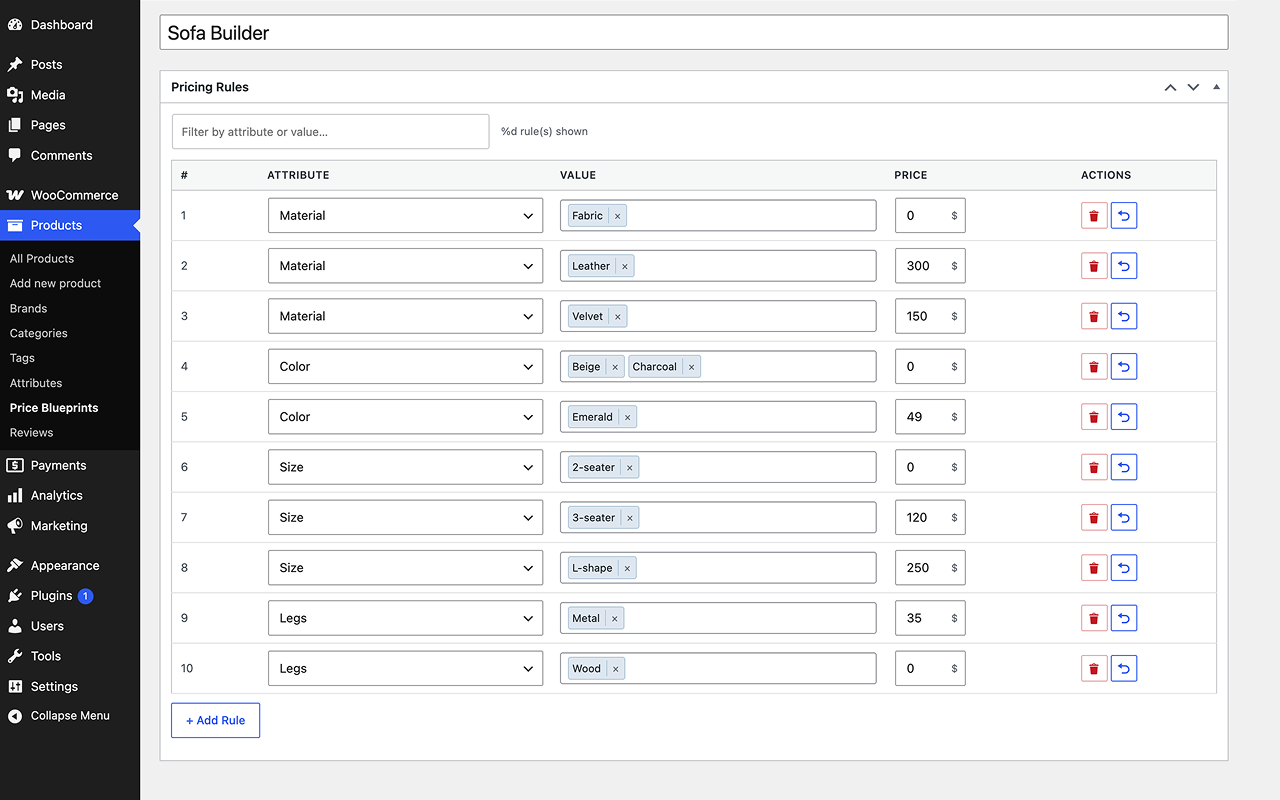
WooCommerce attribute pricing treats product specifications as pricing inputs: each attribute value gets a rule — add, subtract, multiply, or set a specific price — and the rule belongs to the attribute value or rule set, not to every individual product. That's what makes it reusable: define the rule for a material or finish once, and it applies wherever that option is used — the same reusable-rule model our attribute pricing guide covers in full, including how it replaces WooCommerce variations structurally.
A configurable tabletop at a $250 base, priced by size, material, and finish:
- Size: Small +$0, Medium +$80, Large +$160
- Material: Pine +$0, Oak +$140, Walnut +$280
- Finish: Raw +$0, Oiled +$45, Lacquered +$70
A Medium Walnut tabletop with a Lacquered finish costs $250 + $80 + $280 + $70 = $680 — calculated from nine rules instead of generating every possible variation or duplicating add-on fields across each product.
| Question | Product Add-Ons | Attribute Pricing |
|---|---|---|
| Best for | Optional extras, customer-provided details | Core specs that determine price |
| Pricing structure | Configured per product | Reusable rules per attribute value |
| Catalog scalability | Repetitive across products | Scales well when rules are shared |
| Customer input | Text, uploads, checkboxes, services | Structured options: size, material, finish |
| Price updates | Updated wherever the add-on is attached | One rule update, every assigned product |
When to Reach for Each
Add-ons are the right call when the option is customer-specific, service-oriented, or only relevant to one product type: personalisation (names, dates, inscriptions, uploaded artwork), optional services (gift wrapping, rush production, installation), or one-off extras that apply to a single product. Attribute pricing is the better call when the customer's choices describe what the product is and affect price in a repeatable way: materials and finishes that repeat across a catalog, size-based pricing (length, width, capacity, weight bands) applied to multiple products, or any case where variations exist only to store a different price rather than to track distinct stock or SKUs. If that's your case, the attribute pricing setup tutorial walks through building the rules step by step.
Can You Use Both Together?
Yes — in many stores the strongest setup combines both. A custom sign product might use attribute pricing for size, material, and finish to determine the core price, while add-ons handle uploaded artwork, installation notes, or rush production. The customer sees one configurable product page; the data model behind it stays clean, with structured pricing and one-off customer input kept separate.
A Decision Checklist
- Does this option describe the product itself? If yes, it belongs in attributes.
- Will this price modifier be reused across multiple products? If yes, attribute pricing is easier to maintain.
- Is the customer entering unique text or uploading a file? If yes, use an add-on.
- Does this option require per-combination inventory or SKU tracking? If yes, WooCommerce variations may still be required.
- Would a supplier price change mean editing the same option in many places? If yes, move it into reusable rules.
Conclusion
Add-ons and attribute pricing should carry different kinds of complexity: add-ons for optional extras and customer-specific details, attribute pricing for reusable specifications that determine price across a catalog. The mistake is using one mechanism for every configurable product problem — separate the one-off customer inputs from the structured pricing logic, and price updates, product pages, and catalog management all stay easier to manage as complexity grows.